How to send Google Alerts to Slack
You can send Google Alerts to Slack four ways: Slack's RSS app, email to a channel address, a small script that posts to an incoming webhook, or a no-code tool such as Make. Slack's RSS app is probably the first thing to try, because it needs no code.
If you want the wider monitoring method first, read media monitoring on a small budget. On 2026-11-02 we created a real alert for "offshore wind" with RSS delivery and ran a relay script against its feed. We then posted to a real Slack incoming webhook and ran Slack's RSS app on the same feed, in one test workspace. Email-to-channel and the no-code tools were not run: we did not find the channel email option in our workspace, and we did not try Make, Zapier or n8n.
Ways to send Google Alerts to Slack
| Route | Needs | What you get | Run by us |
|---|---|---|---|
| Slack's RSS app | An alert with RSS delivery, /feed subscribe in a channel |
Feed items posted by the app | Yes, in a real workspace |
| Email to a channel address | An email alert, a forwarding rule, a paid Slack plan for the channel address | Emails posted to a channel | No (option not found in our workspace) |
| Script plus incoming webhook | A small script, a scheduler, a webhook URL | Messages you format yourself | Yes, real webhook |
| Make, Zapier or n8n | An account on the tool | Whatever the workflow builds | No |
| Feedmarkdown pull plus the same relay | A Feedmarkdown subscription | Article text instead of snippets | Not run (402 on our demo org) |
Slack's help pages, read on 2026-11-02, say the RSS app is available on all plans. They say channel email addresses are available only on paid plans, while forwarding addresses work on all plans.
Two facts from the real feed apply to every route.
First, the links are wrappers. All 20 entries in our feed linked to google.com/url?...url=PUBLISHER_URL..., not to the publisher. Google Alerts RSS feeds covers the feed layout. Second, titles carry markup. 11 of the 20 titles had <b> tags around the search term, and 5 still held entity sequences such as ' after the XML parser had decoded them once.
Get the Alerts feed URL
Create the alert, set "Deliver to" to "RSS feed", and copy the feed link from the alert list. Setting up Google Alerts walks through the form.
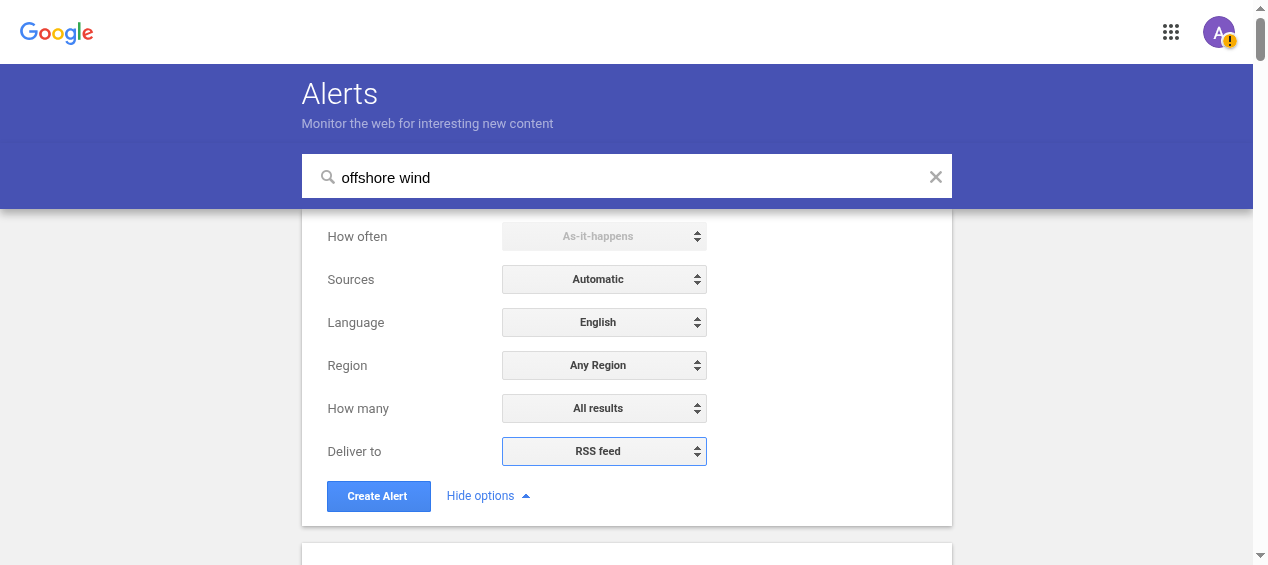
What we saw on 2026-11-02: with "Deliver to" set to RSS feed, "How often" was disabled and fixed at "As-it-happens". The only "Deliver to" options were the account email and RSS feed, and the alert row had an RSS icon and no email setting. We did not check whether any email arrived.
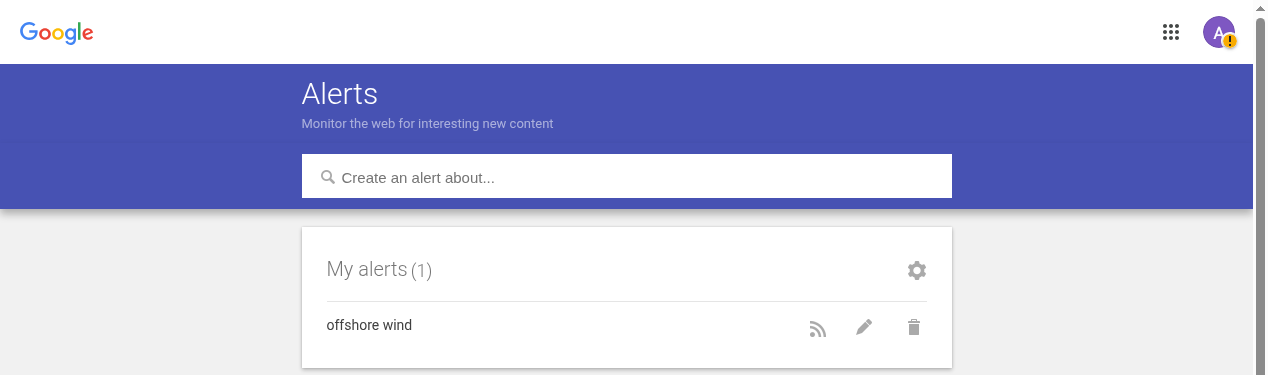
The feed address has the form https://www.google.com/alerts/feeds/YOUR_USER_ID/YOUR_ALERT_ID. It identifies your account, so treat it like a password and keep it out of repos.
Slack's RSS app
For the Slack RSS feed route, you use Slack's own RSS app ("Add RSS feeds to Slack" in the help center), which does the "RSS to Slack" job without code. In the channel, type /feed subscribe followed by the feed URL. Slack's help page, read on 2026-11-02, says the app keeps a bookmark of the newest item and only fetches newer ones. It states no polling interval and no limit on items per check.
We tried it on 2026-11-02 in a real workspace. /feed subscribe with the Alerts feed URL answered "Feed subscribed: Google Alert - offshore wind", and Slack raised no plan error (we did not confirm which plan the workspace is on). The first item appeared within the same minute. Only one item was posted, although the feed held 20 entries, and no more arrived in about four minutes of watching, so we cannot say how often the app polls.

Two things to know. The app does not clean the title: the <b> tags around the search term show as literal text. And the link behind the headline is the Google redirect, a google.com/url?... address with the publisher URL inside it, not the publisher address itself. If either matters to you, use the script below.
To stop the subscription, /feed remove with the feed URL failed for us ("I couldn't find feed ID"). It wants the numeric ID shown by /feed list.
Email to a channel address
Alerts can send email, and in principle a mail filter can forward it to the channel's address. Slack's help page, read on 2026-11-02, says emails sent to a deleted channel address are not posted. We looked for the option in our test channel's details (About, Members, Agents and apps, Automations, Tabs and Settings) and found no "Send emails to this channel" entry and no address. We did not confirm the workspace's plan, so we cannot tell you whether that is the plan or a setting, and we sent no email. For frequency options see setting up Google Alerts; if the email never arrives, see why Google Alerts stops sending.
A script that posts Alerts to a Slack webhook
An incoming webhook takes a POST with a JSON body. RSS to webhook covers the basics. Three facts matter here, all from Slack's docs read on 2026-11-02:
- The body needs a
textfield. Without it Slack answersno_text. A success is a plainok. &,<and>in message text must be escaped as&,<and>. A link is<url|label>.- Apps may post no more than one message per second per channel. Above that, Slack answers 429 with a
Retry-Afterheader.
Clean the entries
This is the version we ran. It reads the feed URL from a file, so the URL never lands in your shell history or ps output.
"""Poll a Google Alerts Atom feed, post new entries to a Slack incoming webhook."""
import json, os, sys, time, html, re, urllib.request
import xml.etree.ElementTree as ET
from urllib.parse import urlparse, parse_qs
FEED = open(os.environ["ALERT_FEED_URL_FILE"]).read().strip() # URL read from a file, never argv/env
HOOK = os.environ["SLACK_WEBHOOK_URL"]
STATE = os.environ.get("STATE_FILE", "seen.json")
MAX_POST = int(os.environ.get("MAX_POST", "5"))
ATOM = {"a": "http://www.w3.org/2005/Atom"}
def esc(s): # Slack mrkdwn control chars
return s.replace("&", "&").replace("<", "<").replace(">", ">")
def clean(s):
# XML parser already decoded once: strip tags first, then unescape once
return re.sub(r"\s+", " ", html.unescape(re.sub(r"<[^>]+>", "", s or ""))).strip()
def publisher(link):
u = urlparse(link)
if u.netloc.endswith("google.com") and u.path == "/url":
q = parse_qs(u.query)
return (q.get("url") or q.get("q") or [link])[0]
return link
seen = set(json.load(open(STATE))) if os.path.exists(STATE) else set()
root = ET.fromstring(urllib.request.urlopen(FEED, timeout=20).read())
entries = []
for e in root.findall("a:entry", ATOM):
eid = e.findtext("a:id", namespaces=ATOM)
if eid in seen: continue
entries.append((e.findtext("a:published", namespaces=ATOM) or "", eid,
clean(e.findtext("a:title", namespaces=ATOM)),
publisher(e.find("a:link", ATOM).get("href"))))
entries.sort() # oldest first
post, skip = entries[-MAX_POST:], entries[:-MAX_POST]
for _, eid, *_ in skip: seen.add(eid) # first-run flood guard
for _, eid, title, url in post:
host = urlparse(url).netloc.removeprefix("www.")
text = f"*{esc(title)}*\n<{esc(url)}|{esc(host)}>"
req = urllib.request.Request(HOOK, json.dumps({"text": text}).encode(),
{"Content-Type": "application/json"})
try:
urllib.request.urlopen(req, timeout=20)
seen.add(eid) # mark seen only after a 2xx
except Exception as ex:
print("post failed", eid, ex, file=sys.stderr)
time.sleep(1.1) # Slack docs: ~1 msg/sec/channel
json.dump(sorted(seen), open(STATE, "w"))
print(f"posted {len(post)}, skipped {len(skip)}")
Why each rule is there:
- Strip tags first, then unescape once. The XML parser decodes one level. Stripping
<b>and then unescaping keeps literal text like<tag>in a title. Doing it the other way round ate it in our synthetic test. - Take
url=from the wrapper. In our feed, every wrapper carried exactly the parametersrct,sa,url,ct,cdandusg. One publisher URL contained a?, and Google had percent-encoded it, soparse_qsreturned the full address. A raw&inside the target would be cut short, and our hand-written test link showed it, but we saw none in this feed. - Dedupe on the entry
id. The state file stores ids, so a rerun posts only entries it has not sent. - Mark seen after a 2xx. A failed POST stays unseen and is retried next run.
- Cap the first run.
MAX_POSTposts the newest few and marks the rest seen, so a new alert does not flood a channel. - Pause 1.1 seconds between posts. That keeps under the one-message-per-second guidance. The script does not handle a 429 reply.
Run it and read the log
On 2026-11-02 we ran this exact script against a real incoming webhook for a channel in a test workspace, using the live alert feed (20 entries). We had run it earlier the same day against a local mock on 127.0.0.1 that returns ok, no_text or invalid_payload as Slack documents them; the terminal capture below is from that mock run.
ALERT_FEED_URL_FILE=alert_feed_url.txt \
SLACK_WEBHOOK_URL=YOUR_SLACK_WEBHOOK_URL \
MAX_POST=5 python3 relay_alerts.py
Against the real webhook, run 1 printed posted 5, skipped 15 and an immediate rerun with the same state file printed posted 0, skipped 0. Here are the five messages in the channel:
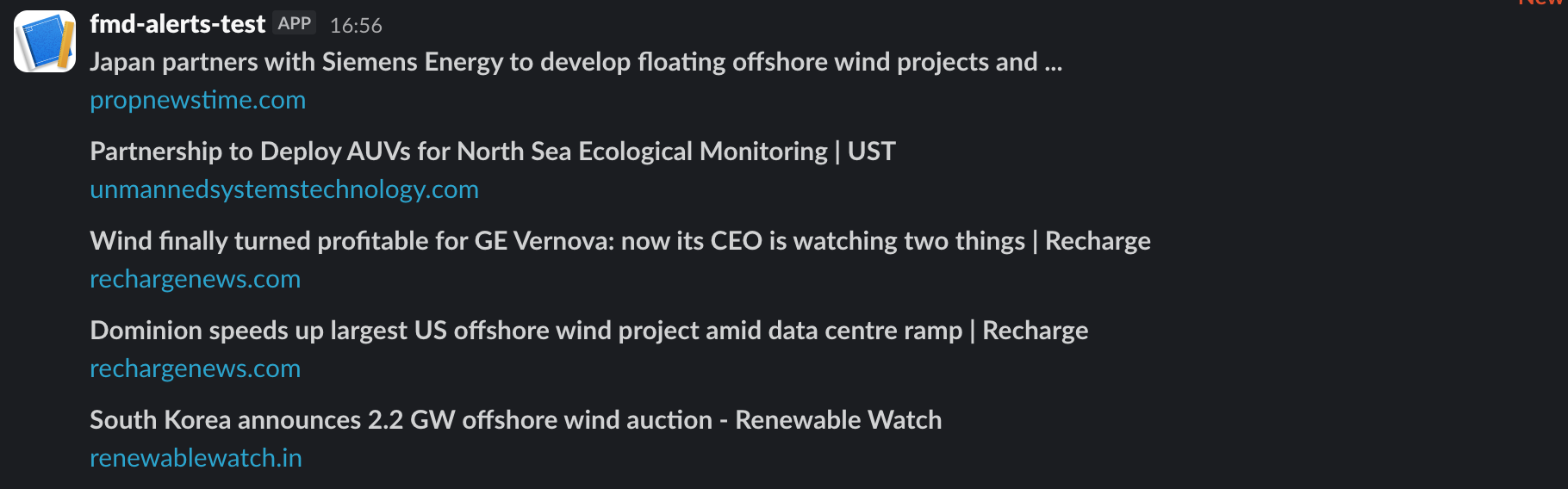
Slack rendered each headline in bold and the hostname as a link. No <b> tags show, and no link preview cards appeared under the messages. Compare the RSS app screenshot above, which kept the tags.
We also sent three bad bodies to the real webhook. {"foo":"bar"} and {"text":""} both returned no_text, and a body that was not JSON returned invalid_payload, each with HTTP 400. That matches Slack's docs.
The mock run, captured as terminal output:
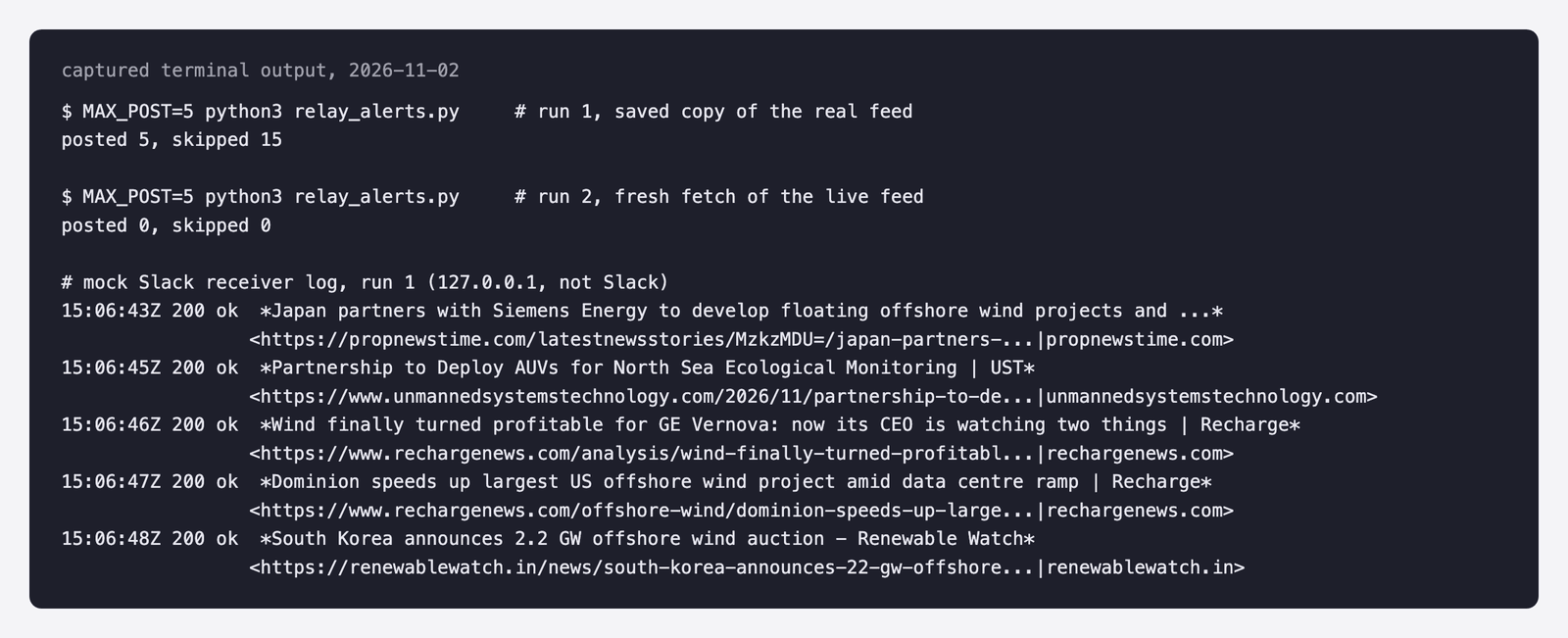
On the mock, run 1 posted 5 and skipped 15, and run 2, a fresh fetch of the live feed, posted 0. A third fetch at 15:14 UTC with the same state file also posted 0: no new entry had appeared, so we have not seen a genuinely new item post. That path is shown only by the skip logic.
We also stopped the mock and ran again with a fresh state file. Both POSTs failed with "connection refused" and neither id was saved as seen. With the mock back up, the next run posted both. The final posted N line counts attempts, so read stderr too. We ran this failure test on the mock only.
The body the mock logged for one entry (indented here for reading):
{
  "text": "*Dominion speeds up largest US offshore wind project amid data centre ramp | Recharge*\n<https://www.rechargenews.com/offshore-wind/dominion-speeds-up-largest-us-offshore-wind-project-amid-data-centre-ramp/2-1-2067178|rechargenews.com>"
}
What this shows and what it does not
It shows that a real Slack webhook accepts our JSON, that Slack renders *title* and <url|host> as a bold headline and a link (see Slack's message formatting guide), and that the cleaning, unwrap and dedupe logic works on a real feed. It does not show how Slack rate-limits you: we paced posts 1.1 seconds apart and never saw a 429. It does not show a genuinely new item arriving over days, how often the RSS app polls, the email route, or the no-code tools. We ran it once, in one test workspace.
Make, Zapier or n8n
No-code tools can poll an Alerts RSS feed and post to Slack. A Make community thread we read on 2026-11-02 describes it: an RSS trigger on the alert feed, polled periodically, or alert emails sent to a Make mailhook, then a Slack module. The same thread shows an empty Text field causing a Slack error. We did not run Make here and quote no prices. We did test Zapier's RSS trigger on a Google News feed: polling gaps, task use and what each item carries are in what the Zapier RSS trigger can't do with news feeds. For an n8n build with a Google News source, see Google News to Slack with n8n.
Send full-text articles instead of snippets
Alerts RSS is as-it-happens, and Feedmarkdown is slower. It polls the Alerts feed on your plan's interval: every 6 hours on Starter, hourly on Pro, every 15 minutes on Agency. In return you get article text.
In our feed, 17 of 20 entries held a short snippet ending in ..., and every author was empty. None had the article. A Feedmarkdown google_alerts source takes the feed URL, unwraps the redirect and strips the title markup (shown below). By design, duplicates are dropped before any scraping, and a pull feed serves full-text Markdown as JSON Feed 1.1 or Atom. A webhook feed also works but needs a public endpoint; RSS to webhook covers it.
We ran the adapter code locally on the saved feed on 2026-11-02, not the hosted API and with no scrape. All 20 entries came out as candidates. Three of them, with the cd and usg values masked:
raw title: Dominion speeds up largest US <b>offshore wind</b> project amid data centre ramp | Recharge
title : Dominion speeds up largest US offshore wind project amid data centre ramp | Recharge
raw link : https://www.google.com/url?rct=j&sa=t&url=https://www.rechargenews.com/offshore-wind/dominion-speeds-up-largest-us-offshore-wind-project-amid-data-centre-ramp/2-1-2067178&ct=ga&cd=MASKED&usg=MASKED
url : https://www.rechargenews.com/offshore-wind/dominion-speeds-up-largest-us-offshore-wind-project-amid-data-centre-ramp/2-1-2067178
raw title: Ocean <b>Winds</b> receives first BC-<b>Wind</b> monopiles at Poland's Świnoujście port terminal
title : Ocean Winds receives first BC-Wind monopiles at Poland's Świnoujście port terminal
raw title: Taihan Renames Cable Vessel for Global Push - Businesskorea
raw link : https://www.google.com/url?rct=j&sa=t&url=https://www.businesskorea.co.kr/news/articleView.html%3Fidxno%3D280181&ct=ga&cd=MASKED&usg=MASKED
url : https://www.businesskorea.co.kr/news/articleView.html?idxno=280181
We planned to run the hosted route too, with the same relay reading the JSON Feed. The first request, POST /v1/source with kind google_alerts on our test organization, returned 402 subscription_required, because it had no active subscription. We stopped there and did not subscribe it. Nothing was created, so we have no run counters, JSON Feed item or Markdown length to show.
Which route to pick
- Least setup: Slack's RSS app.
- Alerts by email, paid Slack plan: forward the email.
- Control over text and dedupe: the script.
- Article text, slower check: Feedmarkdown.
Skip the plumbing
If you want the article text behind each alert, Feedmarkdown takes the alert's RSS URL as a source. Start a 7-day trial at dash.feedmarkdown.com.