How to get a Google Alerts RSS feed
A Google Alert can deliver to an RSS feed instead of your inbox. You change one dropdown, Deliver to, and Google gives you a feed URL for that alert. This post shows the steps, the feed URL, and what a Google Alerts RSS feed actually contains.
We tested this on 2026-10-08 with a personal Google account in desktop Chrome. Google does not document the feed format, so re-check before you build on it. We do not cover how to write good alert queries here.
Switch an alert to RSS delivery
- Open
google.com/alertsand type your query into the Create an alert about... box. We usedoffshore wind. Quotes around a phrase make it an exact-phrase match, so"offshore wind"is stricter than the version in the first three screenshots. - Click Show options.
- Open the Deliver to dropdown and pick RSS feed.
- Click Create Alert.
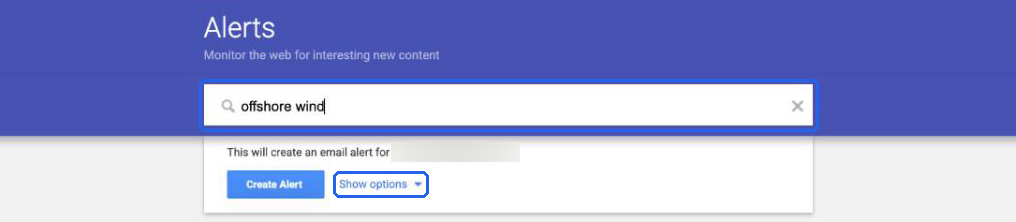
Step 1 and 2: the query is typed in, and Show options is boxed. The email address is blurred.
The options panel has five settings: How often, Sources, Language, Region and How many. It also has Deliver to, which is the one we want. On our account the defaults were At most once a day, Automatic, English, Any Region and Only the best results.
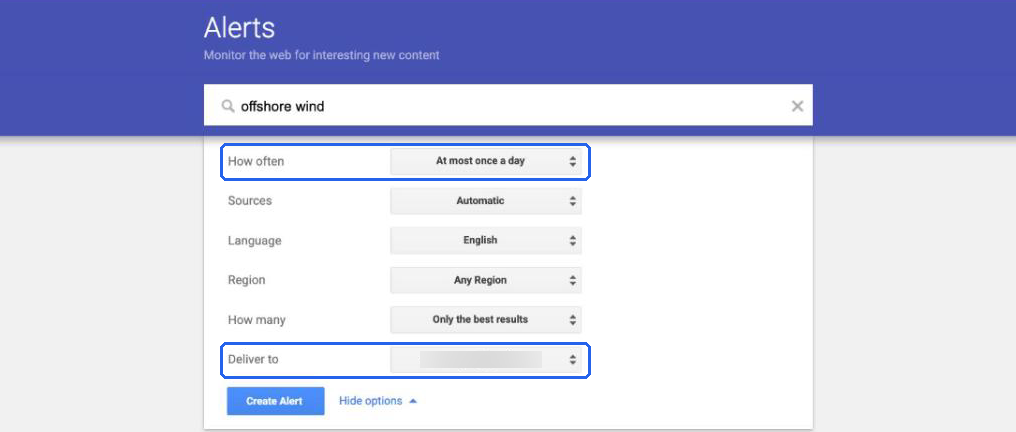
The options panel before any change. How often reads "At most once a day". The email address in Deliver to is blurred.
Deliver to offered two choices: our account email address and RSS feed.
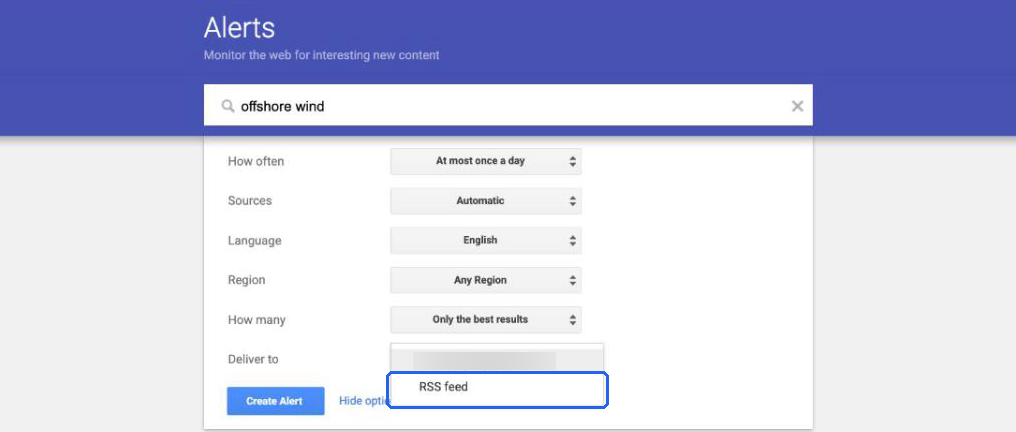
The dropdown open. The first entry is the account email, blurred. RSS feed is boxed.
Once we picked RSS feed, How often greyed out and changed to As-it-happens. You cannot choose a frequency for an RSS alert.
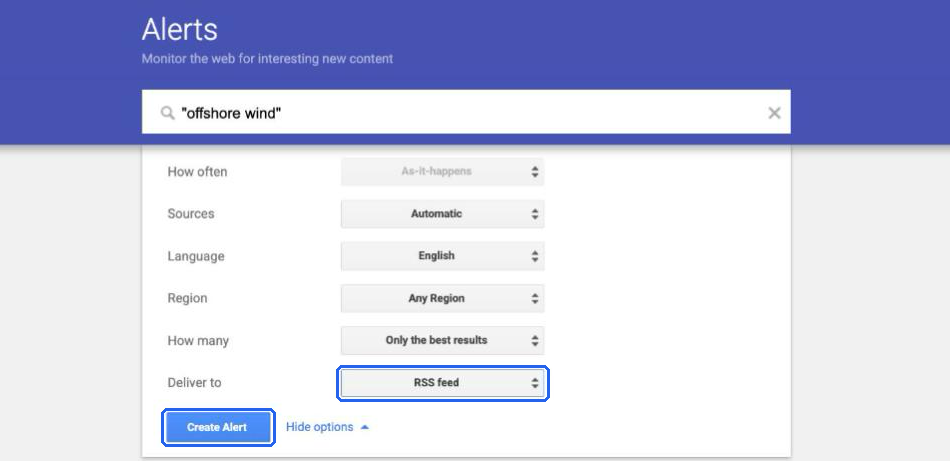
RSS feed selected. This capture used the quoted query "offshore wind", which is the alert whose feed we inspected below.
We did not check whether the email stops for an alert that was switched to RSS. We created the alert with the quoted query "offshore wind" (screenshot 4), then retook the first three screenshots without clicking Create Alert again, which is why the query in them has no quotes.
Find the Google Alerts RSS feed URL
After creation, the alert appears in My alerts. Each row has an RSS icon, a pencil to edit and a bin to delete. The RSS icon sits left of the pencil.
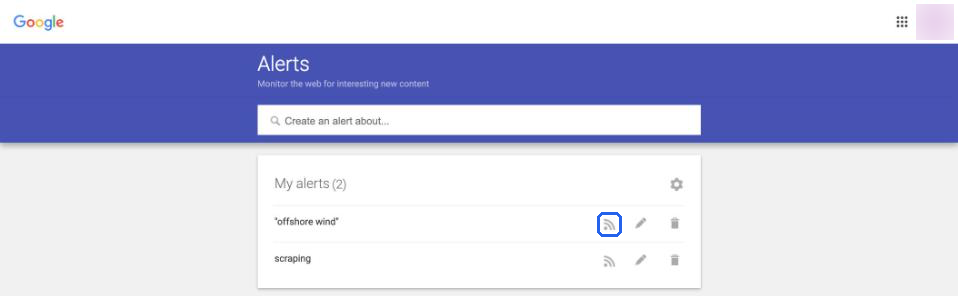
The My alerts list on 2026-10-08. The icon is grey, not orange. It is the same on both rows.
To get the URL, right-click the RSS icon and copy the link address, or click the icon and copy the address from the browser bar. We could not capture Chrome's context menu, so there is no screenshot of that step.
The URL has this shape:
https://www.google.com/alerts/feeds/XXXX/XXXX
Both parts are numeric IDs. We redacted them here and in every screenshot. Treat a real feed URL like a private link, because it identifies your account and your alert. We used a throwaway alert for the test.
The feed works without logging in. A curl with no cookies returned HTTP 200 and text/xml, with 20 real entries. That is what lets a script or an automation tool read it.
curl -s "https://www.google.com/alerts/feeds/XXXX/XXXX" | head -c 300
What a Google Alerts RSS feed looks like
The feed is Atom, not RSS 2.0. The root element is <feed xmlns="http://www.w3.org/2005/Atom">.
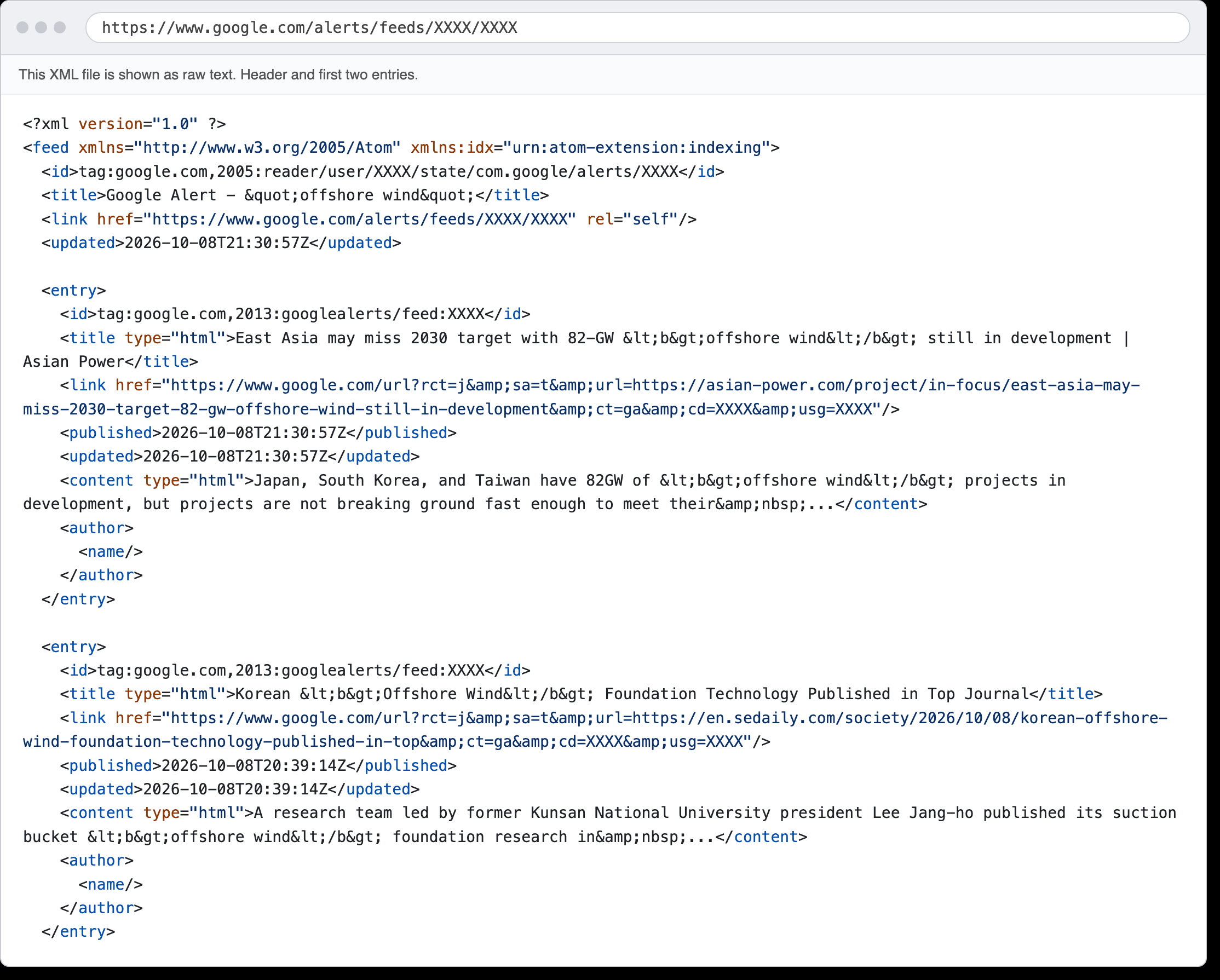
The real feed, pretty-printed and shown as raw text with the IDs redacted. This is our rendering of the downloaded file, not a browser screenshot.
Here is what we saw in the 20 entries:
| Field | What we saw | Notes |
|---|---|---|
title |
type="html", with <b> around the matched terms |
Strip the tags before you use it as plain text. |
link |
A google.com/url?... wrapper |
The publisher URL is inside it. See below. |
published, updated |
Equal in all 20 entries | ISO 8601, UTC. |
content |
type="html", a snippet with <b> tags |
Ends in .... Not the article. |
author |
<author><name/></author> |
Empty in every entry. |
The feed held 20 entries when we fetched it on 2026-10-08. Their published times ran from 13:26 UTC to 21:30 UTC that day. We checked once, so we do not know how the count changes over time or whether 20 is a cap.
The links go through google.com/url
Every link looks like this, with the cd and usg values redacted:
https://www.google.com/url?rct=j&sa=t&url=https://asian-power.com/project/in-focus/east-asia-may-miss-2030-target-82-gw-offshore-wind-still-in-development&ct=ga&cd=XXXX&usg=XXXX
The publisher's address is the url= parameter.
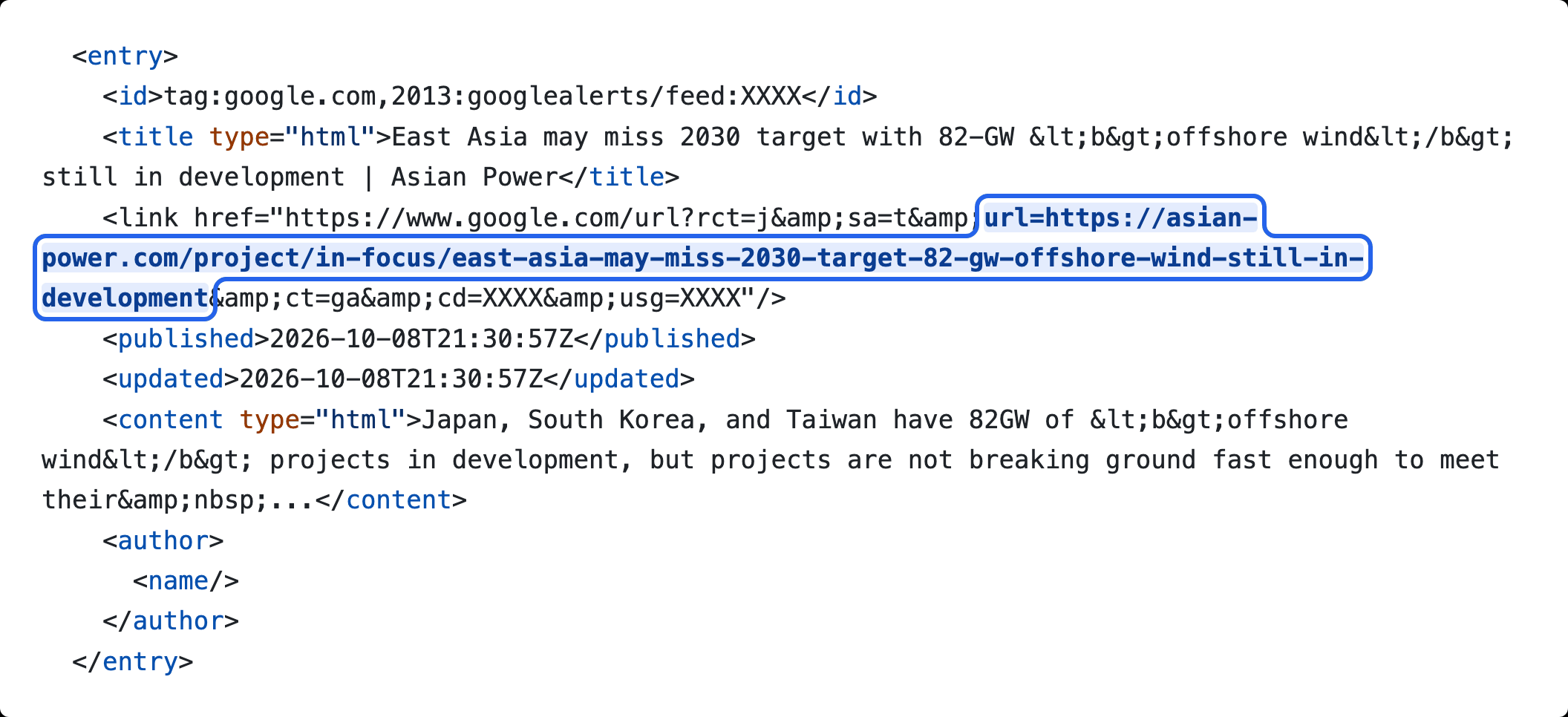
One entry. The boxed part is the real article address inside the Google wrapper.
You might expect curl -L to follow this to the publisher. It does not. We ran curl -sI on one of these links. It returned HTTP/2 200, with no Location header. The body is a small HTML page whose script sets redirectUrl='<publisher URL>', so the redirect happens in the browser, not in HTTP.
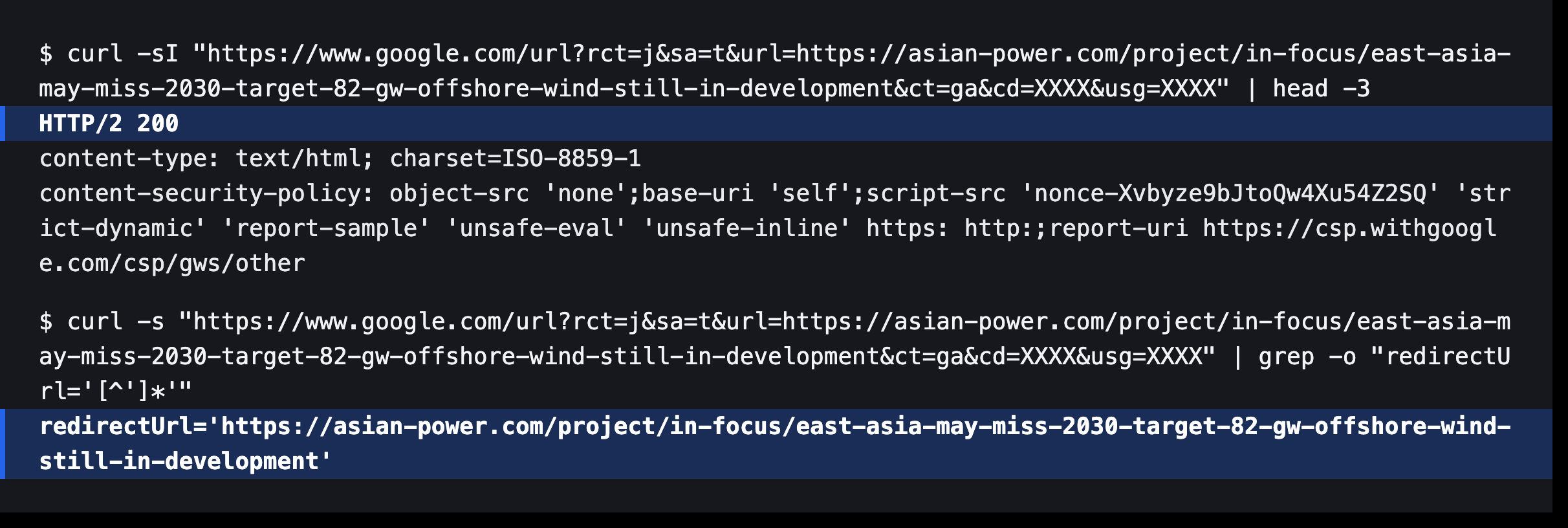
Real curl output. The status line and the redirectUrl line are highlighted. The cd and usg values are redacted.
The redirectUrl matched the url= parameter, so you can skip the request and read the parameter. This Python script prints the publisher URL for every entry. We ran it on the saved feed and it printed 20 URLs.
import sys, urllib.request
import xml.etree.ElementTree as ET
from urllib.parse import urlparse, parse_qs

ATOM = {"a": "http://www.w3.org/2005/Atom"}
xml = urllib.request.urlopen(sys.argv[1]).read()
for e in ET.fromstring(xml).findall("a:entry", ATOM):
    link = e.find("a:link", ATOM).get("href")
    print(parse_qs(urlparse(link).query)["url"][0])
Run it as python3 feed.py "$ALERT_FEED_URL", where ALERT_FEED_URL holds your own feed URL. This is a different redirect from the news.google.com/rss/articles/... links in Google News feeds, which carry no URL you can read. We cover those in the Google News RSS guide.
How often the feed updates
We do not know. We saw one fetch on one day, and RSS delivery locks How often to As-it-happens, so there was no setting to compare. We did not measure how often new entries appear, and we did not test an empty feed.
What you can do with the feed
We only fetched the feed with curl and a Python script. Anything that reads Atom should work, such as a feed reader or an automation tool's feed trigger, but we did not open any of them for this post. One destination we did test, with Slack's RSS app and a small relay script, is in how to send Google Alerts to Slack.
What the feed does not give you:
- The article text. Each entry has a title and a short snippet.
- An author. The field is empty.
- A direct publisher link. You have to take it from
url=.
Is there a Google Alerts API? We did not find one, and we did not check Google's help pages for this post. The feed is the closest thing we know of. For other tools that can watch a query, see Google Alerts alternatives for news monitoring.
Alerts RSS or Google News RSS
We ran the same query, "offshore wind", through both on 2026-10-08. The Alerts feed was one alert with default options. The News feed was https://news.google.com/rss/search?q=%22offshore%20wind%22&hl=en-US&gl=US&ceid=US:en.
| Google Alerts feed | Google News search feed | |
|---|---|---|
| How you get it | Create an alert while signed in, pick RSS feed | Build a URL, no account step |
| Format | Atom | RSS (<item> elements) |
| Items we saw | 20 | 100 |
| Link | google.com/url?...&url=<publisher> |
news.google.com/rss/articles/<opaque ID> |
| Publisher URL | Readable in url= |
Needs a resolver call |
| Fetch without login | Yes, curl returned 200 | Yes, curl returned 200 |
| Update behaviour | Not measured | Not measured |
The item counts are not a fair match. The alert filters to "Only the best results", and we do not know how many items Alerts would hold for a busier query. Treat the 20 and the 100 as two observations, not a ratio.
Our read: Alerts is easier if you want one narrow topic and no URL resolver. Google News gives you more items and URLs you build yourself. Both stop at a headline and a snippet.
To see both feeds used for brand monitoring, with a noise count and a polling script, read media monitoring on a small budget.
Skip the plumbing
Both feeds stop before the article. Feedmarkdown fetches the article page, returns it as Markdown, and drops repeat stories across sources before it scrapes. You get each article by HMAC-signed webhook, or pull it as JSON Feed 1.1 or Atom. It takes a Google News search or a Google Alerts RSS link as a source, so the feed URL from this post is something you can paste in, and the google.com/url wrappers are resolved for you. See the home page for how it works and the pricing section for plans.