RSS to webhook options and their trade-offs
RSS to webhook always means a poller: RSS cannot push, so an RSS webhook is a script or service that checks the feed, keeps a seen-list and POSTs new items to your URL. You can write that poller, rent one from an automation tool, or pay a hosted service. We ran the DIY version on 2026-10-31 and read the vendor pages for the rest that day. We signed up for none of them.
Short answer: with one feed and a server, write the poller. If you already use Zapier, Make, IFTTT or n8n, use that. For Google News or Google Alerts stories with article text, Feedmarkdown fits; it takes no other feeds. If the receiver is an LLM step, feeding news to an LLM covers that side.
Why RSS has no webhook
The standard push option is WebSub, a W3C Recommendation since 23 January 2018 (the current version was republished on 2 June 2026). A feed advertises a rel="hub" link and a rel="self" link. The hub verifies a subscriber's callback with hub.challenge, then POSTs new content signed with an X-Hub-Signature header (spec).
It only works if the publisher runs or names a hub. On 2026-10-31 we fetched three feeds once each with curl and searched the body for a rel="hub" link: news.ycombinator.com/rss, hnrss.org/newest and blog.cloudflare.com/rss/. None had one in the body, and the response headers carried no Link header either. Three feeds is a tiny sample, but plan on polling.
The three options at a glance
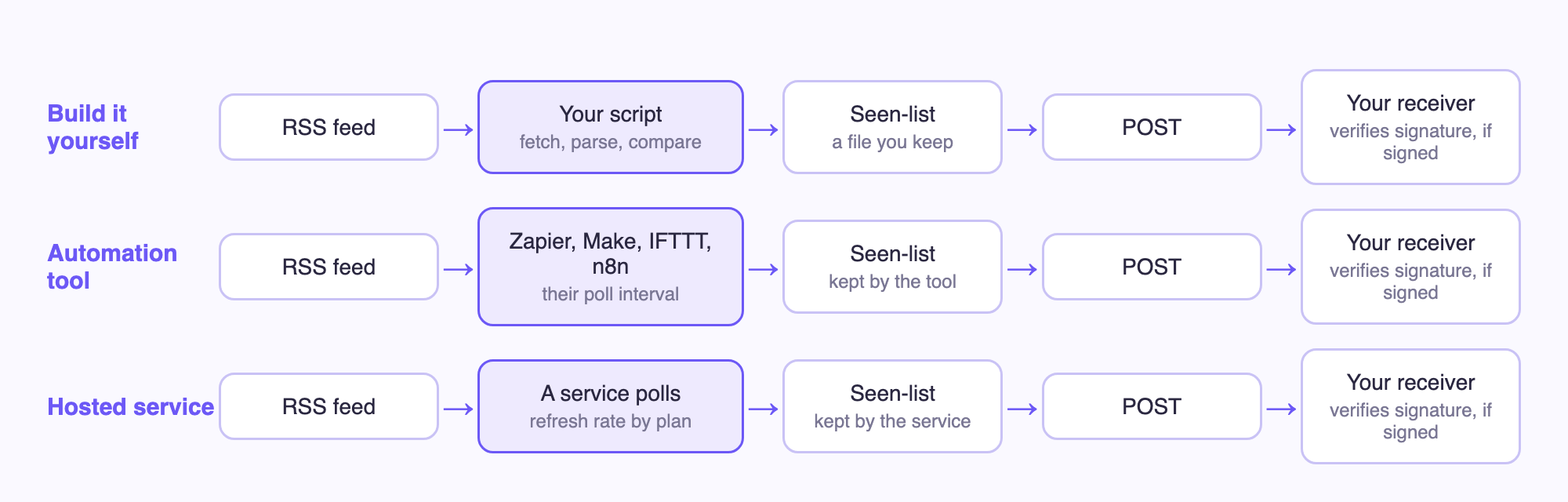
All three have the same shape. They differ in who runs the poller and keeps the seen-list. That decides your latency and how much of the failure handling is yours.
| Option | Who polls | Check interval | Seen-list | Signed POST | Cost shape |
|---|---|---|---|---|---|
| Your own script | You (cron or a long-running process) | Whatever you schedule | You write it | You write it | Your server time |
| Zapier | Zapier | 15 min Free, 2 min Professional | Compares item IDs with earlier runs | Not checked | Free: 100 tasks/month. Paid plans from $19.99/month (pricing page) |
| n8n | Your n8n | RSS Feed Trigger: every X minutes or hours, or a cron expression | Not documented | You add it | Depends on how you host n8n |
| IFTTT | IFTTT | Free: every hour. Paid: every 15 or 5 min (general Applet speed, not RSS-specific) | Not checked | Not checked | Free plan: 1,000 credits/month |
| Make | Make | Set per scenario, minimum depends on plan | Not checked | Not checked | Free: 1,000 credits/month |
| rss.app | rss.app | 60 min on the $8.32 plan, 15 min on the $16.64 plan | Not checked | Not checked | 2 webhooks on $8.32, 10 on $16.64, 50 on $83.32 |
| Feedmarkdown (Google News and Google Alerts sources only, no arbitrary RSS URL) | Feedmarkdown | Every 6 hours on Starter, hourly on Pro, every 15 min on Agency | Built in, with cross-source dedup | Yes, X-Feedmarkdown-Signature (HMAC-SHA256) |
Per plan, see pricing |
Sources, all read 2026-10-31: Zapier's update-time help article, pricing page and RSS integration page (its RSS trigger polls, every 15 minutes on Free); the n8n RSS Feed Trigger docs; IFTTT's plans page (Webhooks on every plan); the rss.app pricing page (monthly figures shown next to an annual-billing saving). Vendors change these, so check the live page.
Build it yourself
A poller fetches the feed, parses the items, skips GUIDs it has seen, POSTs the rest, and marks an item seen only after a 2xx. Failures then retry on the next poll. This is the one we ran, standard library only:
import hashlib, hmac, json, os, sys, urllib.request
import xml.etree.ElementTree as ET

FEED = sys.argv[1]
TARGET = "http://127.0.0.1:8787/hook"
STATE = "seen.json"
SECRET = os.environ["WEBHOOK_SECRET"]

seen = set(json.load(open(STATE))) if os.path.exists(STATE) else set()
req = urllib.request.Request(FEED, headers={"User-Agent": "diy-poller/0.1"})
root = ET.fromstring(urllib.request.urlopen(req, timeout=15).read())
new = 0
for it in root.iter("item"):
    guid = it.findtext("guid") or it.findtext("link")
    if guid in seen:
        continue
    body = json.dumps({"title": it.findtext("title"), "url": it.findtext("link"), "guid": guid}).encode()
    sig = "sha256=" + hmac.new(SECRET.encode(), body, hashlib.sha256).hexdigest()
    r = urllib.request.Request(TARGET, data=body, headers={"Content-Type": "application/json", "X-Signature": sig})
    try:
        urllib.request.urlopen(r, timeout=10)
        seen.add(guid)
        new += 1
    except Exception as e:
        print("delivery failed, will retry next poll:", e)
json.dump(sorted(seen), open(STATE, "w"))
print(f"{new} new item(s) posted, {len(seen)} seen")
We pointed it at a local receiver that checks the signature (one request each to the public Hacker News feed, 31 seconds apart, as its robots.txt asks). The first run posted 30 items. The second posted 0.
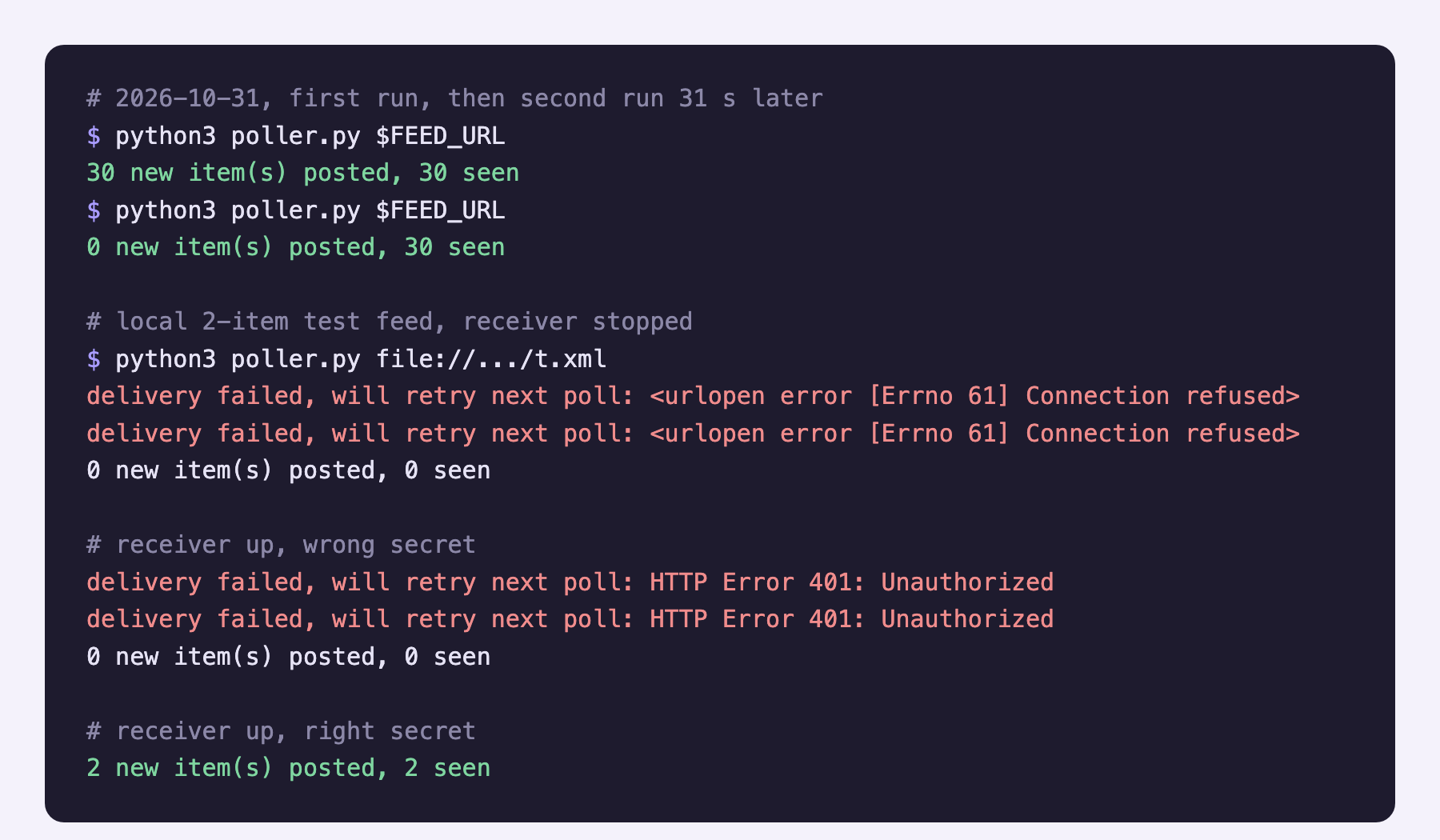
The failure paths worked as designed. With the receiver stopped, both items of a local test feed failed with Connection refused and neither was marked seen. With the receiver up and the wrong secret, the receiver answered 401 and the poller again kept both. With the right secret, both went through. The header here is a neutral X-Signature. It is our own demo, not a standard.
What you own with this option:
- GUID choice. The code falls back from
guidtolink. Pick whichever is stable for your feed. - The first-run flood. The first run sent all 30 items. Seed the seen-list without posting if that matters.
- Retries and backoff. The script retries once per poll, nothing smarter.
- Politeness. Conditional GET with
ETagandLast-Modifiedsaves bandwidth. We did not add or test it.
It is the cheapest and most flexible option, and every failure is yours. If duplicates are your problem rather than missed items, see why Google News RSS has duplicate stories.
Use an automation tool
Zapier has an RSS trigger and a template that sends RSS items to a webhook, and IFTTT has an applet for it. n8n has an RSS Feed Trigger. The check interval is your latency floor. On Zapier's Free plan that is 15 minutes. In n8n you set the poll time yourself, because you host it.
Two trade-offs apply to all of them. RSS items carry a headline, a link and often a summary, not the article text. And whether the outgoing request is signed is usually your job. We did not verify that for Zapier, Make or IFTTT, so check before you rely on it. Zapier's pricing page lists Webhooks as a Professional feature, so a Free plan may not fit if you want to call your own endpoint. We ran the RSS trigger on a Zapier Pro trial and wrote up polling gaps, task use and Google News links in what the Zapier RSS trigger can't do with news feeds.
For one complete n8n build, including an HMAC check on the receiving side, read n8n RSS feed to Slack with full article text. Email is the other common destination, covered in RSS to email three ways.
Use a hosted service
Of the vendors we read, rss.app is the one that sells RSS-to-webhook directly. Refresh rate and webhook count depend on the plan (table above). We did not test it, and we do not know its payload or whether it signs requests. Other services in the search results are out because we did not open their pages.
How to verify a webhook signature
Whatever sends the POST, the receiver should check it. This is Feedmarkdown's scheme, copied from server/webhook.go:
- Header:
X-Feedmarkdown-Signature - Value:
sha256=plus the lowercase hex HMAC-SHA256 of the raw request body, keyed with your webhook secret - No timestamp, no nonce
Three rules matter. Hash the raw bytes before you parse the JSON, because re-serialised JSON will not match. Compare the whole header string, sha256= prefix included. Use a constant-time compare.
import hashlib, hmac
def verify(secret: str, raw_body: bytes, header: str) -> bool:
    expected = "sha256=" + hmac.new(secret.encode(), raw_body, hashlib.sha256).hexdigest()
    return hmac.compare_digest(expected, header or "")
import { createHmac, timingSafeEqual } from "node:crypto";
export function verify(secret, rawBody, header = "") {
  const expected = "sha256=" + createHmac("sha256", secret).update(rawBody).digest("hex");
  const a = Buffer.from(expected), b = Buffer.from(header);
  return a.length === b.length && timingSafeEqual(a, b);
}
Call it with verify("YOUR_WEBHOOK_SECRET", raw_body, header) and answer 401 when it returns false.
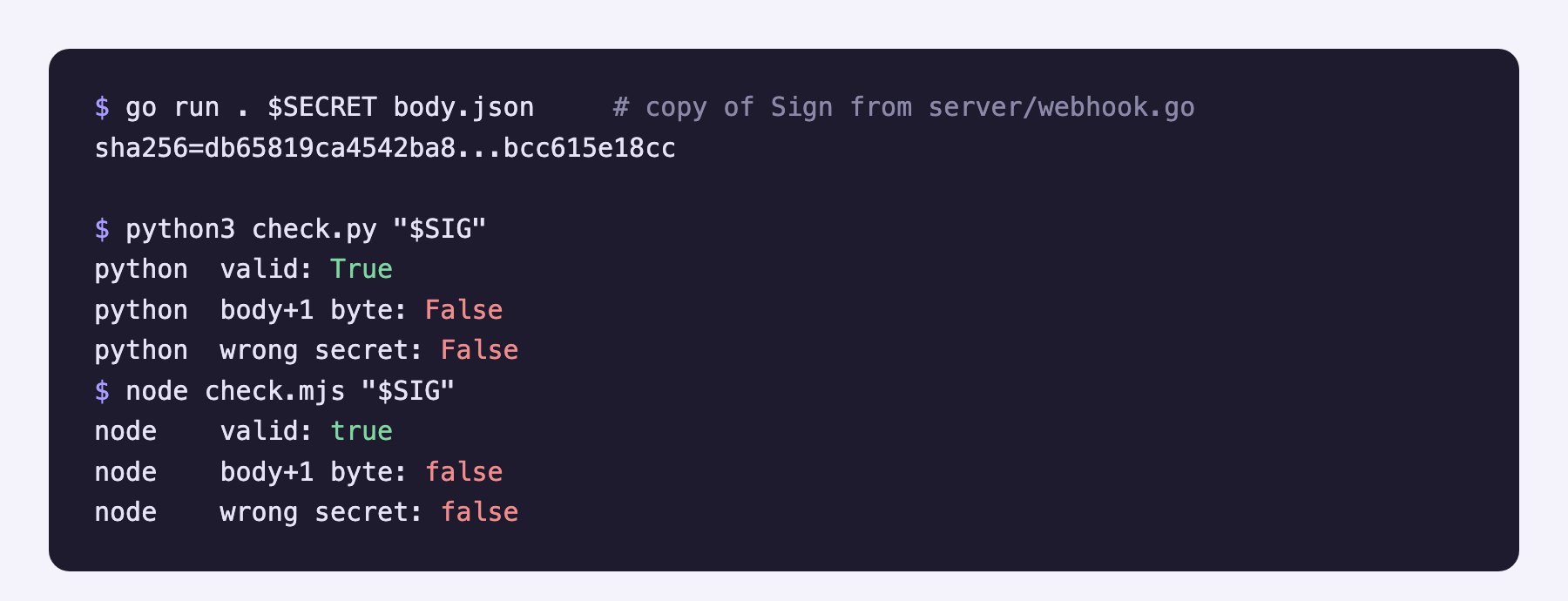
To check this against the real thing, we copied the Sign function from server/webhook.go into a small Go program and had it sign a test body. We did not run the server itself. Both verifiers accepted that signature. Both rejected it when the body was one byte longer and when the secret was wrong.
There is no replay protection. The signature does not include a time, so anyone who captures a valid request can send it again. Each article arrives as one POST with an X-Feedmarkdown-Delivery header. That value stays the same across the automatic retries of one article, so store it and ignore repeats.
The delivery id does not cover manual re-sends. A re-send through the API uses the same sender but gets a new delivery value, so also dedupe on the article url in your receiver.
The sender retries network errors, 408, 429 and 5xx responses, up to 3 attempts per article, and does not retry other 4xx responses. A 401 from your verifier is therefore not retried. A wrong secret shows up as undelivered items, which you can re-send later with POST /v1/feed/{id}/webhook/resend.
Which RSS to webhook option to pick
- You have one feed and can run a script: build it.
- Your team already lives in Zapier, Make, IFTTT or n8n: use the tool.
- Many generic RSS feeds and no appetite to run anything: a hosted service such as rss.app.
- Google News or Google Alerts topics where you want article text: Feedmarkdown (payload and "When Feedmarkdown fits" are below). For any other feed it is the wrong tool today.
What a Google News webhook payload looks like
Below is one Google News story as Feedmarkdown posts it. Each feed gets a signing secret when you create it, and every POST is signed with that secret, as described above.
The body is JSON, not RSS: one ArticlePayload per article, with the article text as Markdown. Only the first six fields are the contract: title, url, source, author, published_at and markdown. id, feed_id and source_id are sent too, but do not rely on them. published_at can be null, and author and source can be empty strings. The article is made up. Field names and order come from server/webhook.go, and the Markdown is cut short:
{
  "title": "Offshore wind farm clears final permit",
  "url": "https://news.example.com/offshore-wind-permit",
  "source": "Example Daily",
  "author": "A. Reporter",
  "published_at": "2026-10-31T09:30:00Z",
  "markdown": "# Offshore wind farm clears final permit\n\nRegulators approved the last permit on Friday...",
  "id": "art_123",
  "feed_id": "feed_123",
  "source_id": "src_123"
}
We signed this file as is with the Go copy of Sign (the real sender posts compact JSON, and the signature covers whatever bytes it sends). On 2026-10-31 we replayed it with curl against the local receiver, which uses the Python verify above:
SIG=$(cd go-sign && go run . "$WEBHOOK_SECRET" ../payload.json)
curl -s -o /dev/null -w "%{http_code}\n" -X POST http://127.0.0.1:8787/hook \
  -H "Content-Type: application/json" \
  -H "X-Feedmarkdown-Event: article.new" \
  -H "X-Feedmarkdown-Delivery: 7d1c0a52-0000-4000-8000-000000000001" \
  -H "X-Feedmarkdown-Signature: $SIG" \
  --data-binary @payload.json
The receiver answered 204 and logged 200 ok Offshore wind farm clears final permit. The same body with the header sha256=bad got 401. The delivery id is a placeholder we typed.
The markdown field can go straight into an LLM prompt or digest. Feeding news to an LLM shows how. For a worked use case, regulatory news monitoring sends new items from a topic query to a webhook.
Sending it to Slack or Discord
Slack and Discord incoming webhooks do not check your signature, and each expects its own JSON. Slack's incoming webhooks page says the message goes in a text field and that the webhook URL itself is the secret. Discord's webhook docs say it takes content (up to 2,000 characters) and relies on the token in the URL. We read both pages on 2026-10-31. Put a small relay in between: verify our signature, reshape the JSON, post it. This n8n build does that with a mocked Slack. We did not test a relay against real Slack or Discord here. For Google Alerts specifically, how to send Google Alerts to Slack tests a relay against a real Slack webhook.
When Feedmarkdown fits
Feedmarkdown does not take arbitrary RSS URLs, so it will not turn a generic feed into a webhook. Plain RSS and direct site sources are not live. What it does take is Google News and Google Alerts sources. It removes duplicates across sources before scraping, fetches the full article as Markdown, and sends one signed JSON POST per article (see the payload above), or serves the same articles as JSON Feed 1.1 or Atom.
Check intervals are per plan on the pricing section: every 6 hours on Starter, hourly on Pro, every 15 minutes on Agency. If that fits, start a feed in the dashboard.